Postprocessing and chemistry
After a PROTEUS simulation has run, its atmospheric state can be postprocessed to compute detailed chemistry, synthetic observations, and multi-angle thermal profiles. Atmospheric chemistry can also be coupled live during a run. This page covers all three workflows.
Atmospheric chemistry with VULCAN
PROTEUS can couple to the VULCAN chemical kinetics model to compute atmospheric composition. The atmos_chem.when configuration variable controls when chemistry is calculated. There are three modes:
| Mode | atmos_chem.when |
Description |
|---|---|---|
| Manually | "manually" |
Chemistry is skipped during simulation. Run it yourself afterwards via the CLI. |
| Offline | "offline" |
Chemistry runs once automatically after the simulation finishes, on the final atmospheric state. |
| Online | "online" |
Chemistry runs at every output snapshot during the simulation, coupled to the evolving atmosphere. |
All three modes require atmos_chem.module = "vulcan" and the AGNI atmosphere module (atmos_clim.module = "agni").
Manually mode (default)
When atmos_chem.when = "manually" (the default), no chemistry is calculated during or after the simulation. You can run it yourself at any time using the CLI:
proteus offchem -c [cfgfile]
This is useful when you want to experiment with different chemistry settings (for example network or photochemistry) without re-running the full simulation.
Offline mode
When atmos_chem.when = "offline", PROTEUS automatically runs VULCAN once after the main simulation loop completes. It uses the final atmospheric temperature-pressure profile and composition as input. Results are written to offchem/vulcan.csv in the output directory.
This is the recommended mode for most use cases: it adds chemistry as a post-processing step with minimal overhead.
Online mode
When atmos_chem.when = "online", PROTEUS runs VULCAN at every output snapshot (controlled by params.out.write_mod and params.out.dt_write_rel) during the main simulation loop. This couples the chemistry to the evolving thermal state of the atmosphere.
Key differences from offline mode:
- Per-snapshot output: Each snapshot produces its own output file (
vulcan_{year}.csv) rather than a singlevulcan.csv. - One-time network compilation: The chemical reaction network is compiled only once on the first snapshot, then reused for subsequent snapshots.
- Skipped when desiccated: If the planet loses its entire volatile inventory, online chemistry is skipped for subsequent snapshots.
Online mode is more expensive but captures the time evolution of atmospheric chemistry alongside the thermal evolution.
Chemistry configuration
The chemistry behaviour is further controlled by settings under [atmos_chem] and [atmos_chem.vulcan] in the configuration file. Key options include:
atmos_chem.vulcan.network: Chemical network to use ("CHO","NCHO", or"SNCHO")atmos_chem.photo_on: Enable photochemistryatmos_chem.Kzz_on: Enable eddy diffusion mixing
See the atmosphere and chemistry reference for the full list of options.
Synthetic observations
PROTEUS can generate synthetic transit and eclipse depth spectra from the simulated atmospheric state using petitRADTRANS. Spectra are produced as "perfect" observations — no telescope noise model is applied — so they represent the intrinsic planetary signal.
Access the synthetic-observation functionality via the CLI:
proteus observe -c [cfgfile]
PROTEUS also runs this step automatically at the end of a simulation when
observe.module = "petitRADTRANS" is set in the configuration file.
Composition sources
Spectra are computed from composition sources controlled by observe.source:
all(default): run all available sources belowoutgas,profile, oroffchem: run only that source
Available sources:
| Source | Description | Skipped when |
|---|---|---|
outgas |
Constant-with-height VMR from the outgassing module | Never |
profile |
Full T(p) + VMR profile from the atmosphere NetCDF | atmos_clim.module = "dummy" |
offchem |
Photochemical mixing ratios from VULCAN | atmos_chem.module is none |
Output files
For each source, two CSV files are written to observe/ inside the run
directory:
transit_<source>_synthesis.csv— primary transit deptheclipse_<source>_synthesis.csv— secondary eclipse depth
Use observe.spectrum_type to choose which products are written:
both(default): writes both files abovetransit: writes onlytransit_<source>_synthesis.csveclipse: writes onlyeclipse_<source>_synthesis.csv
Both files are tab-separated with the following column layout:
| Column | Description |
|---|---|
Wavelength/um |
Wavelength [μm] |
None/ppm |
Baseline depth [ppm] with all species present |
<SPECIES>_removed/ppm |
Depth [ppm] with that species removed (one column per line species in the mix) |
Set observe.remove_one_gas = false to disable the
<SPECIES>_removed/ppm columns and write baseline-only spectra.
The baseline column uses the full set of line species found in the
petitRADTRANS opacity table directory ($FWL_DATA/prt/input_data). Species
below the clip_vmr threshold are excluded.
Plotting
The plot_spectra diagnostic produces a two-panel PDF figure:
- Upper panel: primary transit depth as a function of wavelength.
- Lower panel: secondary eclipse depth as a function of wavelength.
Both panels overlay the baseline spectrum (black) with all per-species
removed spectra (coloured by species). The figure is saved to
plots/plot_spectra.pdf (or .png depending on params.out.plot_fmt).
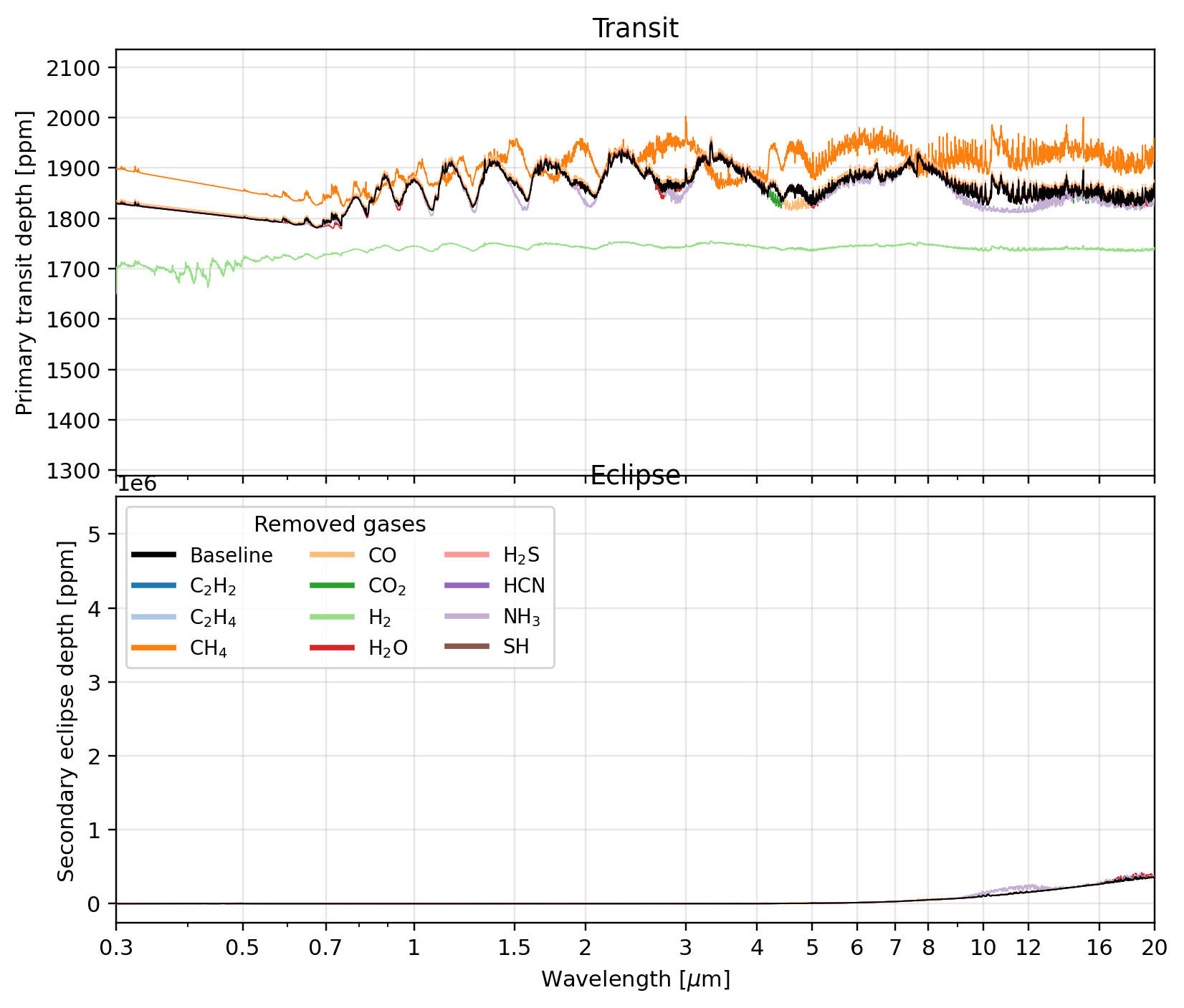
plot_spectra output.
Upper panel: primary transit depth \[ppm\]. Lower panel: secondary eclipse depth \[ppm\].
The black line is the baseline (all species present); coloured lines show the spectrum
with each gas removed in turn.See the Observations configuration reference for all available options.
Multiprofile analysis with AGNI
PROTEUS can postprocess the planet's atmosphere for a number of zenith angles. This yields localised thermal profiles based on the angle of irradiation on the atmosphere, which is particularly useful for tidally locked planets.
Access this functionality via the CLI, from within the PROTEUS directory:
julia tools/multiprofile_postprocess.jl output/[outputdir] 0,36,45,89
This example computes results for four zenith angles (0, 36, 45, 89), but the script works for any number of zenith angles and creates a new ..._atm_z{angle}.nc file in the data/ directory of the output folder for each angle.
See also: Usage overview | Running and output | Atmosphere and chemistry reference | Observations reference | VULCAN submodule